Flannelling by IT man? Can anyone advise the difference between a computer in 'sleep' and 'shut down'

Ive used the same IT man for years to repair and replace various computers. But lately as I learn more, I wonder if I'm being flannelled. £60 for brief advice today seems a lot which is why I am beginning to wonder if I am being stupid! Can anyone please advise, the difference between a computer in 'sleep mode' and 'shut down.' Is it ok to leave a laptop plugged in all the time or does it wear the battery out? Is it best to shut down all the time or can I 'sleep' it most of the time. Advice would be appreciated. 

Parents
  • Can anyone please advise, the difference between a computer in 'sleep mode' and 'shut down.

    Sleep mode just suspends the computers operation, maintaining all the apps and files you have open as they are. It is primarily to save power.

    Shut down is actually similar but it closes all your apps and files leaving the computer in a standby move that allows for a faster start up. 

    If you need to really reset things then a Restart ir recommended but Micorosoft have changed this so it is really just the same as a Shut Down.

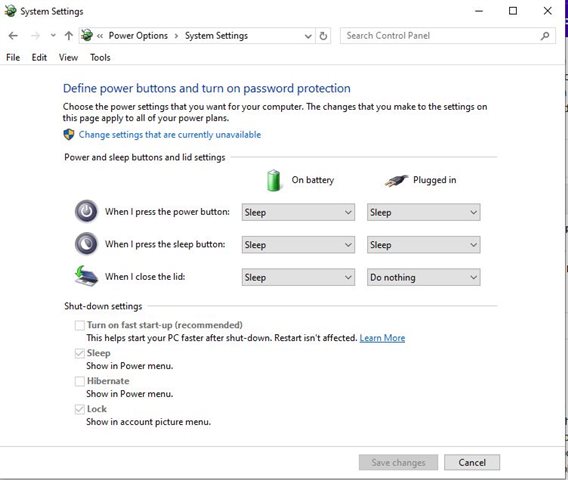
    To properly reset memory you need to switch off a setting called Allow Fast Start (it is enabled by default) - to do this Go to the settings menu, click on System, choose Power & Sleep, Additional Power Settings, Click on Choose What The Power Buttons Do, click on Change Settings That Are Currently Available

Reply
  • Can anyone please advise, the difference between a computer in 'sleep mode' and 'shut down.

    Sleep mode just suspends the computers operation, maintaining all the apps and files you have open as they are. It is primarily to save power.

    Shut down is actually similar but it closes all your apps and files leaving the computer in a standby move that allows for a faster start up. 

    If you need to really reset things then a Restart ir recommended but Micorosoft have changed this so it is really just the same as a Shut Down.

    To properly reset memory you need to switch off a setting called Allow Fast Start (it is enabled by default) - to do this Go to the settings menu, click on System, choose Power & Sleep, Additional Power Settings, Click on Choose What The Power Buttons Do, click on Change Settings That Are Currently Available

Children
No Data