Flannelling by IT man? Can anyone advise the difference between a computer in 'sleep' and 'shut down'

Ive used the same IT man for years to repair and replace various computers. But lately as I learn more, I wonder if I'm being flannelled. £60 for brief advice today seems a lot which is why I am beginning to wonder if I am being stupid! Can anyone please advise, the difference between a computer in 'sleep mode' and 'shut down.' Is it ok to leave a laptop plugged in all the time or does it wear the battery out? Is it best to shut down all the time or can I 'sleep' it most of the time. Advice would be appreciated. 

  • Uses more battery in sleep mode. Because it is still on, but it uses less than if it was powered up.

    it might be expensive to leave your charger in and in sleep mode. But then again, it won’t use much if it is in sleep mode. Also you need to consider how old the device is. Because laptops lose energy efficiency over time, and the older it is, will mean that it requires more energy to charge it fully. And also the battery doesn’t operate at full capacity when it is older. The battery capacity decreases over time.

    it’s also important to consider keeping a healthy habit of switching things off completely if you aren’t going to use them, because if you don’t, then your energy bills will be huge.

    consider the environment when thinking about future actions. Because whether you believe it or not, small decisions like forgetting to turn off your lights, have long-term consequences on the future of humanity.

    also consider how green your area is, because there will probably be an energy efficiency scheme, where perhaps mains sockets switch off, once a device is chargedTm(that’s a good idea, I trademarked it in case it’s a new idea).

    so think of it like this:

    sleep mode= requires an alarm clock, a splash of cold water (not literally) or a loud yell to start it up

    shut down= requires a summoning spell if you need to use it again

  • I tried to post this a few days ago but it didn't seem to work, so here it is again....

    There is a difference between sleep and turning it off, when it's sleeping it has to use a tiny bit of power to keep its memory on. When it's turned off everything is stored to the disk. So if you leave it sleeping and not plugged in eventually the battery will run out (or on some types of computer it will turn itself off before that happens).

    And keeping the battery constantly topped up does shorten the life a bit. In fact on Apple laptops, if they think you don't use the battery much they stop charging at 80%.

    But most people don't worry about these things, they are not massive effects unless you plan on keeping your computer a long long time and rely on the battery to have its full capacity.

  • There is a difference between sleep and turning it off, when it's sleeping it has to use a tiny bit of power to keep its memory on. When it's turned off everything is stored to the disk. So if you leave it sleeping and not plugged in eventually the battery will run out (or on some types of computer it will turn itself off before that happens).

    And keeping the battery constantly topped up does shorten the life a bit. In fact on Apple laptops, if they think you don't use the battery much they stop charging at 80%.

    But most people don't worry about these things, they are not massive effects unless you plan on keeping your computer a long long time and rely on the battery to have its full capacity.

  • try ChatGPT that will give you an answer for free.

    Sleep is low power and quick restart - when shutdown is power off (well the computer clock on the motherboard still runs) and when you turn on its a full boot of the OS so will take longer.

    I've had no issue leaving laptops plugged in myself - if you use only the laptop screen then on battery usually (setting dependant) it will be less bright than when plugged in.  I dont use my laptop screen instead use 4k monitors . 

    Does it damage the battery I guess running on battery occasionally and allowing a decent discharge say down to 20% wouldnt hurt and perhaps may help the battery, they generally only have so many charging cycles in them - and I've found (my daughters laptop at uni) as she was plugging in thenn using battery often it lasted around 3 years - whereas my laptop batteries last longer when plugged in all the time - that's just my observation

  • to Moderator: I got this message

    'An error occurred while trying to execute a scripted extension. Details of the issue were logged for review by the administrator.'

    Did my question breach the rules?? 

  • Sleep means the display is off and the computer isn’t processing running the programmes the same way as if it was on. It will still use some power but will stop the screen burning out as you still have programmes running in the background such as your email client. Having it turned off means the power has shut completely from running the background programmes etc . I would shut it down over putting it to sleep. I put it to sleep when I go on my lunch break. When I go home I turn it off with shut down 

  • Can anyone please advise, the difference between a computer in 'sleep mode' and 'shut down.

    Sleep mode just suspends the computers operation, maintaining all the apps and files you have open as they are. It is primarily to save power.

    Shut down is actually similar but it closes all your apps and files leaving the computer in a standby move that allows for a faster start up. 

    If you need to really reset things then a Restart ir recommended but Micorosoft have changed this so it is really just the same as a Shut Down.

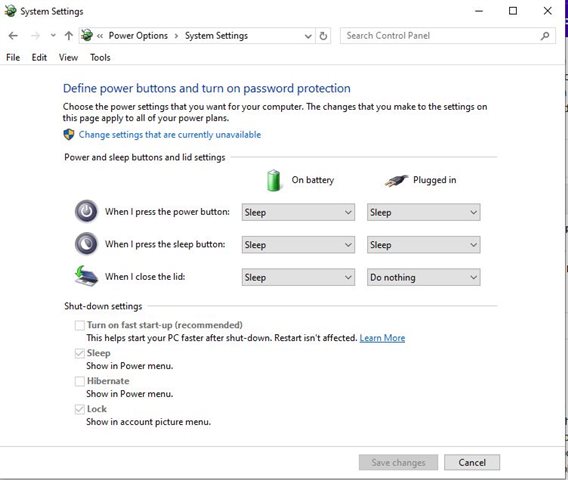
    To properly reset memory you need to switch off a setting called Allow Fast Start (it is enabled by default) - to do this Go to the settings menu, click on System, choose Power & Sleep, Additional Power Settings, Click on Choose What The Power Buttons Do, click on Change Settings That Are Currently Available

  • Pretty good explanation! 

    I work from home and my computer is on all day- at lunch time and dinner time I'll go away and it will typically go into sleep mode itself after a while and a just jiggle the mouse to wake it up and keep working when I come back.

    At night I shut it down to refresh internal memory space (not a big deal for most but the stuff I do it's better).

    A note on batteries. I listened to a very interesting radio programme before about batteries (it was really fascinating). Batteries perform best and last longer if they operate between 20-80%. Having them full all the time or keep draining them to nothing is bad for the chemicals inside (why this is is really fascinating but probably out with the requirements of the post). 

    In short, it's better not to leave it plugged in, but don't let it run out completely. And the further bit is don't actually charge it to 100%, but don't stress that too much. This is the same for all lithium rechargeable batteries I think.

  • I’m sure there are tech people here who know more about this than I do, but I have always understood ‘sleep mode’ to be useful if you are going to be away from your computer for a short time (I don’t know exactly how short as the opinions I’ve heard range from a few minutes to a few hours). ‘Sleep mode’ uses very little electricity yet it allows you to resume working without going through all the palaver of switching the computer on and giving it time to reboot. If I’m working at my computer all day, I would allow it to ‘sleep’ while I take breaks but would shut it down before going to bed.

    ’Shut down’ is advisable if you are away from your computer for more than a few hours (again I don’t know how long that is. I would shut mine down at the end of the day or before if I’m not going to be working through the night). ‘Shut down’ means the computer is switched off so it isn’t using any electricity. It is important to ‘shut down’ a computer regularly (how often is that?) because it gives it time to perform disc clean ups, virus scans and update software. It also reduces wear and can prolong its lifespan.