I need an Iain!

My pooter's acting up again, I'm not asking for help because I won't understand what I'm being told, but I wish I had an Iain for whom all these things are so easy.

When I open a window and get my usual page with icons etc and do a search, then go down the page to the result I want, I get the page from the icon that was under the search page? Or it goes back a page I already have open whilst closing down the new one. Has my pooter had it?

Parents
  • When I open a window and get my usual page with icons etc

    Just to help us here - is this when you are using the program you use to browse the web or is it clicking on the bottom left of the screen to see all the programs installed on your computer?

    Has my pooter had it?

    Nah, it is probably just in need of a kick. I would suggest starting with a reboot - Start - Power - Restart

    This tends to reset any temporary stuff and is a great starting point.

  • I always turn my pooter off after every session, shut everything down and switch off. 

    This when I've got the internet open, I use firefox and theres the page with icons of regularly used sites and the search bar, one at the top and one in the middle of the page. I enter a search, say for amazon and a drop down list appears with various options, some about the river some about amazon servies etc, I will move the cursor to amazon books and click, but instead of getting amazon books, I get a page for the icon under the drop down menu. Sometimes say if I'm reading a post and I want to check something, I will open another window and search for the relevant information, when I click on the option I want from the drop down list relating to the search, the second window that I was searchng on shuts down completely and I end back here, or it just switches me here leaving the search in limbo

    If it happens mid afternoon then I know its the internet connection itself acting up, as it does every day even though we now have new fibre optic superfast BB and new cables and everything coming into the house

Reply
  • I always turn my pooter off after every session, shut everything down and switch off. 

    This when I've got the internet open, I use firefox and theres the page with icons of regularly used sites and the search bar, one at the top and one in the middle of the page. I enter a search, say for amazon and a drop down list appears with various options, some about the river some about amazon servies etc, I will move the cursor to amazon books and click, but instead of getting amazon books, I get a page for the icon under the drop down menu. Sometimes say if I'm reading a post and I want to check something, I will open another window and search for the relevant information, when I click on the option I want from the drop down list relating to the search, the second window that I was searchng on shuts down completely and I end back here, or it just switches me here leaving the search in limbo

    If it happens mid afternoon then I know its the internet connection itself acting up, as it does every day even though we now have new fibre optic superfast BB and new cables and everything coming into the house

Children
  • Thanks Iain, I tried the box in the upper left hand corner and it asked me for a password that I don't have, I don't know why I don't have one, I don't think I've ever been asked for one before even when it was installed.

    I still can't remember how to C&P, although I know I've done it so may times before, it's always like the first time and I'm struggling through it.

    Maybe I'll take the thing back to the shop I got it from and ask them to look into whats going on. I'm still getting "flying windows" were several pages come out of nowhere, fly really fast towards me and then disapear, they're all black so I don't know what they are or where they're coming from.

    I've had firefox updates quite recently, but this problem precededs the updates.

    Thank you for your help.

  • I always turn my pooter off after every session, shut everything down and switch off.

    The restart option is actually better than shutting it down as the shut down is not what it used to be - it is more of a standby state now to save time getting all the bits and pieces of Windows back up to speed.

    I wonder if there is a bug with your Firefox browser - a quick way to check is to go to the top left of the screen (there should be text for File, Edit View, Hisrory, Bookmarks, Tools and Help) - click on Help and About Firefox. If there is an updated version available then it should tell you in the pop up screen that appears and you can install it.

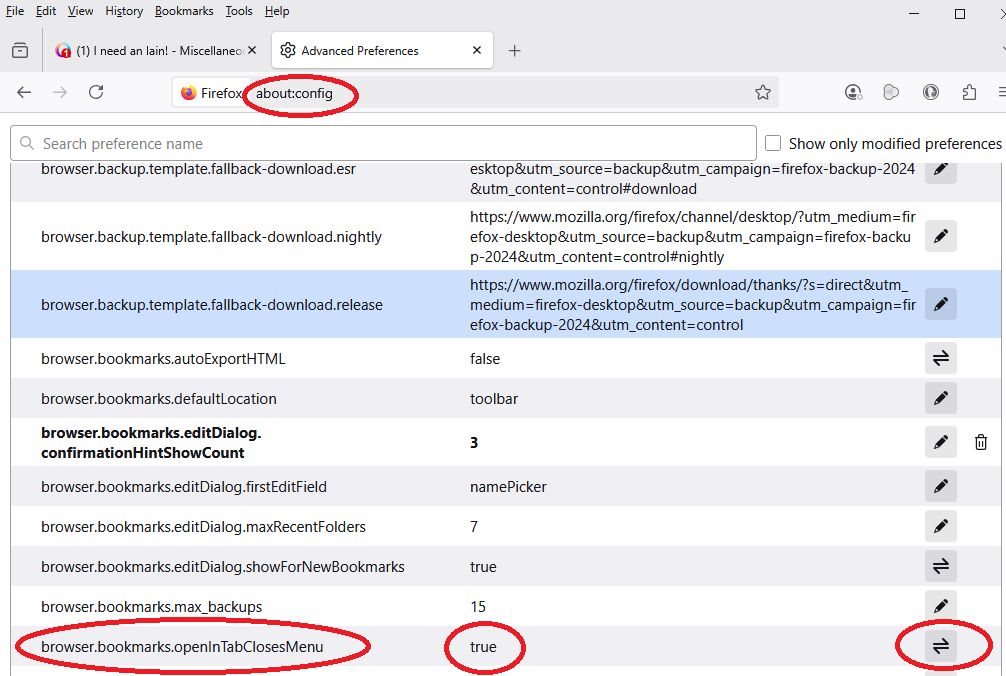
    There is a setting that will stop the search menu from closing after you click on the link if that is what you are trying to achieve here. You may want to do it with someone more tech savy on hand in case you need to reverse it but in essence you paste the following into the address bar:

    about:config

    This will give a warning that you are about to open a list of settings that can cause problems if you mess about. We are changing one specific setting so it should not be an issue. Click on the button to go ahead.

    You will see a long list of options to tweak - it is alphabetical so scroll down (a dozen or so pages) to the setting for:

    browser.bookmarks.openInTabClosesMenu

    I think this will be set to TRUE - you can click on the two way arrow to the right of it to set this to FALSE. 

    Close Firefox and reopen it and try again. You can repeat the process to undo the change if it does not do the trick.