Turning off the AI feature on my search engines

Hi. Could I get some IT advice.

Is it possible to turn off the AI feature of my search engines? My son has taught me to type -AI on the search. But I wondered if there was a settings feature to make it a default to have no AI.

My default search engine is Google Crome.

Can't stop the Data Centres, but 'Every Little Helps' xx

Thanks in advance,

Mrs Snooks

  • Interesting that we share the same habits. 

    I don't fully trust my mobile service but I'm afraid convenience has overruled my security concerns. I think e-sims have slightly strengthened security but if someone is really determined, they will find a way to hack. 

  • Heh, I also keep two bank accounts and will use the payments only one (which only has a small amount of money in it) for some things although I mostly use a credit card for online purchases. My CC company  blocks anything they think is suspicious and send me a text message asking me to confirm the payment.

    In theory, my mobile service provider won't permit a scammer to duplicate my sim card due to requiring a special passcode. I haven't checked out mobile phone companies' security for a couple of years and hope they have generally improved. Some of the tales of handing criminals a duplicate sim have been shocking.

  • I use Brave Browser, except when using Firefox to create security-generated passwords. Also use DuckDuckGo; as a search engine.

    Avoid direct contact with AI, like the plague.

  • You too! I suspect we use the same European VPN, password manager, email and cloud. 

    Unlike you, I use my phone for payments, but I have security protocols in place for that — a dedicated payments only bank account and debit card. I transfer the minimum amount of funds needed from my income bank account to the payment card, to cover purchases. Most of the time, there is little money in the account.

  • I wonder if anyone here constantly clears their search history and clears cookies? I do it every day and sometimes several times a day. I don’t know if it’s being obsessive or keeping safe.

    My desktop is set up to clear history and cookies whenever I shut down the computer. Sometimes I use private browsing for a site and I use a VPN 95% of the time, only disconnecting it for the occasional irritating site that refuses to load while the VPN is running. I use a secure European VPN, password manager, email and cloud, and for sites like eBay, Amazon etc I use a security key rather than relying on anything stored on my desktop or laptop. I don't use my phone for email or payments. Nerd security. Laughing

  • Automatic, AI driven search results are annoyingly sneaking in all over the place.

    I haven’t experience of turning off AI in Chrome as I avoid it, and Google, where possible. I know Google generally gives the most comprehensive results.

    I changed my default search engine to DuckDuckGo a while back, because it prevents most annoying advertisements popping up and I can choose whether or not to ask AI during each search. If I need to do a comprehensive search I switch to Google and back again.

    I wonder if anyone here constantly clears their search history and clears cookies? I do it every day and sometimes several times a day. I don’t know if it’s being obsessive or keeping safe.

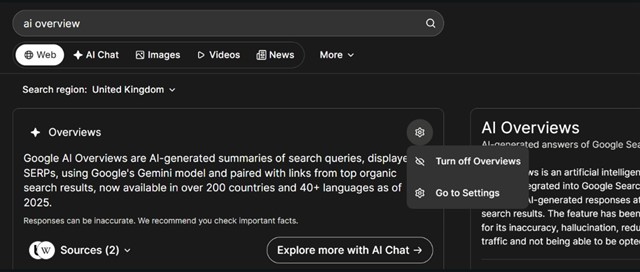
  • For removing ai overviews on ecosia in chrome

  • That's good. I think my experience with people looking for IT answers is warped by overexposure to those who would read your original response and throw up their hands in despair because the slightest whiff of a techie solution is too much for them. It's always good to have different options at different levels. 

    I tend to find Google search engine is better for shopping and use it occasionally for that. 

  • Yes, I didn't want to get into their pros and cons when there's a practical workaround that enables Google (the most popular search engine, and a very comprehensive one) to be still used.

    A different one can be chosen instead, if preferred, via the same settings menu in my earlier reply.

  • Thanks for this. 

    However, one can simply load up a different search engine in Chrome and use that as the default search engine, so one isn't confined to using Google search even in the Chrome browser. 

  • To switch off Google's irritating AI overview on its search engine, log out of Google. That's it as far as getting shot of the overview.

    To get AI overviews did previously require someone to be signed in, but that’s no longer the case (it changed last year).

    For example, without being signed in to Google, whether I use the Chrome app or the Safari browser on my Mac, it doesn’t stop Google from including AI overviews.

    But if using the Chrome app, the process that I detailed in my previous reply does effectively remove them for Google searches.

  • Google is the search engine, while Chrome is a browser. I use Vivaldi as a browser, which offers various search engines: Bing, Google, DuckDuckGo (known as DDG), Ecosia and Startpage. DDG is known for privacy while Ecosia offers enviornbmental support. DDG, Ecosia and Firstpage don't have an AI overview.

    To switch off Google's irritating AI overview on its search engine, log out of Google. That's it as far as getting shot of the overview.

    If you have to keep signed into Google (because you use their email service), use a different search engine.

    I switch AI and its predecessors off everything and have for decades, starting with Microsoft's paperclip, Cortana and whatever else MS wishes to bring in. The same with 'free' cloud services and, since January 2025, Gmail. But then, I'm one of those paranoid computer nerds. Grinning

  • Unfortunately, there's currently no official way to turn that feature off for Chrome.

    However, if you're using the Chrome browser app on a computer, you can change your settings to make Google's "Web" results your default type of search. That effectively removes the AI Overview from your search results:

    • In the Chrome app, go to: Settings > Search engine > Manage search engines and site search.
    • Under Site Search: click Add.
    • Name your customised search (eg "Google without AI Overview").
    • Enter any text you like in the shortcut box (eg "myowngoogle").
    • In URL, enter this, after removing all of the spaces in it (I had to add them here to stop it turning into a link):
      https : // www. google. com /search?q=%s&udm=14
    • Save those search settings.
    • In the list where your new, saved search now already appears, click the three dots next to it and choose "Make default".
    • Done!

    Now, whenever you search using Chrome's address bar, it should open Google's Web results tab / view, with no AI overview, rather than showing the usual view, which can often include a Google AI Overview.

    You don't need to read these unless you want to - they're just to confirm (in case you want to verify) that what I've suggested is safe and has the effect you've requested:

    Google Chrome Help - Set default search engine and site search shortcuts

    Ars Technica - Google Search’s “udm=14” trick lets you kill AI search for good

  • Large IT companies seem resolutely against customer choice, unfortunately. In my view all apps and features of apps should be removable. AI searches come up with plausible inaccuracies more times than facts in my experience.