Unexpected requests to sign in when visiting our main website

Hi all

There have been mentions, in one or two threads, of problems when people here go to our main site, for example to look at the advice and guidance section. These are (of course) unexpected, but also something that we have not been able to reproduce. If you have seen this issue, and can help us to diagnose it, please post in this thread or PM me.

There have been one or two mentions of an unexpected sign-in challenge. There have also been mentions of a request to complete some basic information about yourself. The following points may help as background:

  1. There is no requirement to sign in to access our advice and guidance pages, or indeed the majority of the main site, and most visitors to that site are not signed in. We use sign-ins mainly for these purposes.
  2. If you do choose to sign in, the same sign-in should work on both the main site and this community. However, at present, you need to sign in on each one separately (but with the same email address and password).
  3. When you first register on the main site, we ask some basic information such as name and connection with autism, under the heading, "Tell us a bit about you".
  4. If you create a password on the main site, but stop at that point and choose not to answer the questions, you will be asked the questions again next time you visit the main site, if you are still signed in to that site. Obviously, this includes if you follow links from this site. Visiting while signed in with an "incomplete" account like this is the only circumstance in which it is expected that the questions might appear.
  5. There are top-menu options to sign out, as usual on any site.
    1. However, you can also sign out of our main site from anywhere by following this link: https://www.autism.org.uk/logout

Thank you for any further information that you can provide.

Parents
  • Hi Apologies if this repeats what other people have said.

    I was signed in to the forum and clicked on the "advice & guidance" tab but was met with the "Tellus about you" page.

    I signed out of the forum (and waited for confirmation I had signed out) then clicked on the "advice & guidance" tab but was met with the "Tellus about you" page. (I was not signed in to any other websites using the same Google account).

    I cleared my cookies and tried again but was still met with "tell us about you".

    I went via Google (searched - NAS then clicked on link "What is autism?" as this is similar to what you would have on advice & guidance page) but was still met with "Tell us about you"

    I'm using Firefox on a laptop.

    Edit - apologies this was supposed to go in the other thread which you suggested but I was going back and forth between signing in and out that i've put it on the wrong thread.

  • I've moved it Slight smile

    Signing out of the forum/community won't help. That's because the issue is that you have a sign-in account for the main website https://www.autism.org.uk/ where you have created a password (and so signed in to that site) but not completed the questions that follow. That site is asking you to complete those questions. If you would prefer not to do that, please sign out of the main website.

    Although you use the same email address and password, signing in here, to the community, is a separate action. That's what I was trying to explain in my first message at the start of this thread. I'm sorry that this has been confusing, and I can see a number of possible improvements, but I won't lengthen this by discussing them here.

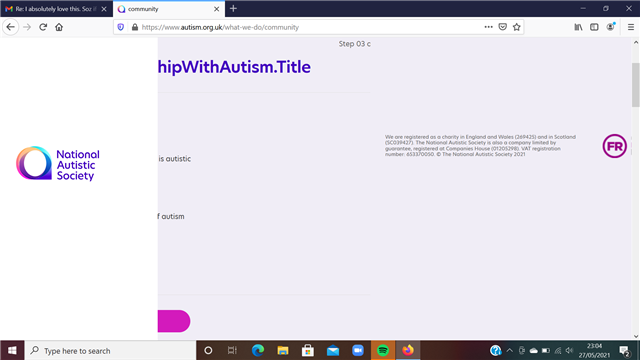
  • We are getting there! So I thought I'd put my details in to the "Tell us about yourself". I did step 1 and 2 then got to step 3

    this is what happened on step 3. I'm using Firefox on a laptop.

  • That's odd. Could I ask you to try again? We had a one-off glitch yesterday that affected various page loads; I can see, for example, that the title text on that page failed to load as well, and you got a placeholder string.

    I've just tested on Firefox and that page was OK. If it's still a problem, try checking that your Firefox is up to date, clearing cache, disabling extensions, and/or using a private browsing window. If that's still an issue, you could use the following site and PM me the link or code that it provides (so that I can see your set-up in more detail).

    https://www.whatismybrowser.com/

    I don't recommend posting that information in a public thread such as this.

Reply
  • That's odd. Could I ask you to try again? We had a one-off glitch yesterday that affected various page loads; I can see, for example, that the title text on that page failed to load as well, and you got a placeholder string.

    I've just tested on Firefox and that page was OK. If it's still a problem, try checking that your Firefox is up to date, clearing cache, disabling extensions, and/or using a private browsing window. If that's still an issue, you could use the following site and PM me the link or code that it provides (so that I can see your set-up in more detail).

    https://www.whatismybrowser.com/

    I don't recommend posting that information in a public thread such as this.

Children
No Data